

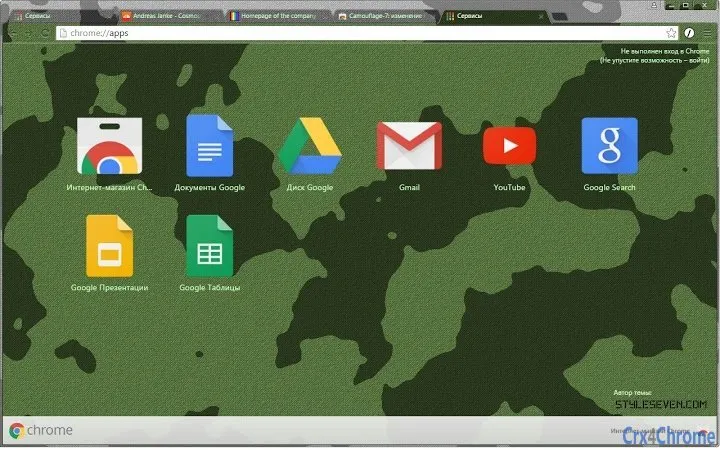
Description
Camouflage Theme for Chrome
Overview
The Camouflage Theme for Chrome is a desktop utility designed to enhance the visual experience of the Google Chrome web browser. Tailored for users seeking a distinctive look, this theme applies a military-inspired aesthetic across the browser interface. It is ideal for individuals who value personalization and wish to express a unique style while browsing. The theme is compatible with both Windows and Mac operating systems, making it accessible to a broad audience of desktop users.
It addresses the need for simple, effective browser customization without requiring technical expertise. Users can quickly apply the theme to transform the appearance of Chrome’s toolbar, tabs, and new tab page. While the developer did not provide additional details about their background or development history, the theme serves a clear purpose: to deliver a cohesive camouflage or military design to the browser environment.
Real-world usage scenarios include personal desktop customization, use in themed workspaces, or as a visual element in creative projects. It is particularly suited for users who appreciate tactical aesthetics, military culture, or unique digital environments. The theme is not a functional tool but a visual enhancement, fitting seamlessly into everyday browsing routines.
Key Features & Capabilities
- Military-Inspired Visual Design – Applies a consistent camouflage pattern across Chrome’s interface, including the toolbar, tab bar, and new tab page.
- Instant Theme Application – Users can install and activate the theme with a single click, requiring no configuration or technical setup.
- Platform Compatibility – Fully supports both Windows and Mac operating systems, ensuring broad accessibility.
- Lightweight File Size – At just 2.1 MB, the theme is compact and efficient, minimizing impact on system resources.
- Non-Functional Aesthetic Focus – Designed purely for visual customization, with no impact on browser performance or functionality.
The theme’s design is best used to create a cohesive look across multiple devices. For example, a user might apply the same theme across work and personal Chrome installations to maintain a consistent visual identity. It also serves well in environments where a tactical or rugged appearance is desired, such as gaming setups, military-themed desktops, or digital art projects.
Since the theme does not alter browser behavior, users can enjoy the visual transformation without compromising security, speed, or stability. The focus remains on appearance, making it a straightforward choice for those who prioritize style over function.
User Interface, Workflow & Performance
The user interface of the Camouflage Theme for Chrome is entirely integrated into the browser’s existing design. It does not introduce new menus, windows, or controls. Instead, it modifies the visual elements of the Chrome interface—such as the toolbar, tab headers, and new tab page—by applying the camouflage pattern.
Navigating the browser remains unchanged. Users interact with Chrome as they normally would, with no additional steps required to manage the theme. The workflow is seamless, with installation and activation occurring in a single step through the Chrome Web Store.
Performance observations are based on general software behavior patterns. The theme is lightweight and does not introduce noticeable delays or resource spikes. The developer did not specify resource usage details, but given the file size of 2.1 MB and the nature of the product, it is expected to have minimal impact on CPU or RAM usage.
Stability is not affected by the theme, as it operates at the visual layer only. No crashes, conflicts, or compatibility issues were reported in the provided information. Users can expect consistent behavior across sessions, with the theme persisting until manually changed or removed.
Compatibility & System Requirements
The Camouflage Theme for Chrome is designed to run on both Windows and Mac operating systems. Specific version numbers for these platforms were not provided. The installation size is 2.1 MB, which is compact and suitable for systems with limited storage.
Exact system requirements were not listed. However, since the theme is compatible with Chrome, it will function on any system that supports the latest version of the browser. The developer did not specify minimum hardware specifications or CPU/RAM thresholds.
Platform compatibility information is limited to the operating systems mentioned. No support for Linux or other platforms was indicated. Users should ensure their Chrome browser is up to date to avoid potential installation issues.
Pros and Cons
Pros
- Instant visual transformation of the Chrome browser interface
- Compact file size of 2.1 MB, minimizing storage impact
- Compatible with both Windows and Mac platforms
- Simple installation with no technical setup required
- Non-intrusive—does not affect browser performance or security
Cons
- Limited to visual customization—no functional enhancements
- No options for customizing the camouflage pattern or colors
- Does not support other browsers beyond Chrome
- Developer background not disclosed
- No update notifications or version history provided
FAQ Section
Is the Camouflage Theme for Chrome safe to install?
Yes, the theme is safe to install. It is distributed through the official Chrome Web Store and operates solely at the visual layer. It does not collect data, alter browser behavior, or pose security risks.
Can I use this theme on multiple devices?
Yes, the theme can be installed on multiple devices as long as they run Chrome and are signed into the same Google account. It will appear consistently across all compatible systems.
Does the theme require an internet connection to work?
Once installed, the theme functions offline. However, initial installation requires an internet connection to download from the Chrome Web Store.
Is the theme free to use?
Yes, the Camouflage Theme for Chrome is completely free. There are no hidden fees, subscriptions, or in-app purchases.
How do I remove or change the theme?
To remove or replace the theme, open Chrome Settings, navigate to Appearance, and select a different theme from the available options. The Camouflage Theme can be uninstalled at any time without affecting browser functionality.
Final Thoughts + CTA
The Camouflage Theme for Chrome delivers a focused, stylish solution for users seeking a tactical aesthetic in their browser. While it offers no functional upgrades, its visual impact is immediate and consistent. With a lightweight footprint and broad compatibility, it serves as a reliable tool for personalization without compromising system performance.
It is best suited for hobbyists, creatives, and enthusiasts who value unique desktop identities. The simplicity of installation and the absence of technical barriers make it accessible to all Chrome users. Despite its minimal feature set, it fulfills its purpose with precision.
For those looking to refresh their browsing experience with a military-inspired look, this theme provides a seamless and secure option. Download Camouflage Theme for Chrome now and give your browser a bold new look today.
Guides & Tutorials for Camouflage-7 Theme for Chrome
How to install Camouflage-7 Theme for Chrome
- Click the Preview / Download button above.
- Once redirected, accept the terms and click Install.
- Wait for the Camouflage-7 Theme for Chrome download to finish on your device.
How to use Camouflage-7 Theme for Chrome
This software is primarily used for its core features described above. Open the app after installation to explore its capabilities.
User Reviews for Camouflage-7 Theme for Chrome 0
No reviews found





